

Your inbox pings: Failed login attempt detected. A few minutes later, there are dozens of them. That’s usually not someone mistyping a password. It’s an automated brute force attack trying to break in while you’re busy doing something else.
Brute force attacks aren’t new, but 2026 versions are faster, quieter, and often powered by AI. Attackers plug into leaked password databases, spin up GPU servers, and let scripts hammer away at login forms until something gives.
If you’re running a website, managing online accounts, or simply concerned about digital security, understanding how these attacks work – and how to defend against them – isn’t optional anymore.
The good news: The defenses are not complicated. But you do have to use them.
What a Brute Force Attack Really Is
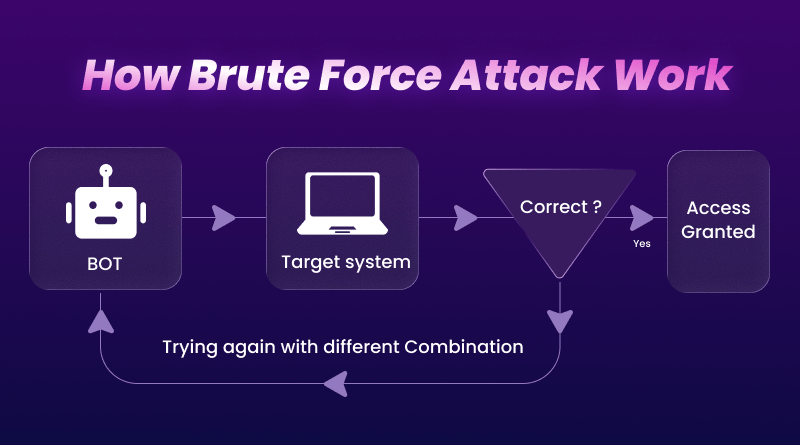
At its simplest, a brute-force attack is just guessing. Software keeps trying passwords until one works: no fancy exploit, no clever social engineering – just persistence plus computing power.
A typical workflow looks like this:
- Pick a target: WordPress admin, SSH, email, VPN, or any login box that sits on the public internet.
- Feed the tool: a list of usernames, password patterns, or leaked credentials.
- Let the script run: it sends one login after another and watches for anything that doesn’t fail.
What has changed in the last few years is how smart the guessing has become. Attackers no longer start with “aaaaaa” and count upwards. They:
- Use huge lists of real passwords from old breaches.
- Prioritize patterns humans love (Season+Year!, CompanyName123, Welcome2026!, etc.).
- Let machine‑learning models predict likely variations based on job titles, industries, or even public social-media data.
So the attack is still guessing, but the guesses are far from random.
Why Brute Force Attacks Are Worse in 2026
Three trends made these attacks more dangerous.
1. Autonomous AI Doing the Boring Work
What used to be a script some hobby hacker babysat is now an automated system that can:
- Discover new targets.
- Tune attack speed to avoid lockouts.
- Switch IPs or proxies automatically.
- Chain multiple steps (recon → password guessing → lateral movement).
Security vendors already expect adversaries to hijack AI agents themselves, using prompt injection or misconfiguration to make corporate automation work for the attacker instead of the business.
2. Machine Identities Everywhere
It’s no longer just users and passwords. Modern systems are complete:
- API keys
- Service accounts
- Access tokens
- CI/CD credentials
In large cloud setups, machine identities now outnumber humans by a considerable margin. Research shows that over‑privileged service accounts and keys are a significant factor in cloud breaches. Attackers love them because they often have broad permissions and almost no monitoring.
3. Rivers of Leaked Credentials
Every major breach dumps another pile of usernames and passwords onto the dark web. Attackers don’t throw that data away.
- Test leaked logins on other services (credential stuffing).
- Use them to train models that generate more realistic password guesses.
- Chain them with social data (industry, tools, and location) to achieve higher hit rates.
If you reuse passwords, this is where it comes back to bite you.
Common Types of Brute Force Attacks
Understanding the main types helps you recognize what you’re defending against.
Traditional Brute Force
Try as many combinations as possible for a single account. Today, this is mainly used against:
- Very weak passwords
- Offline hashed password dumps
- Systems with no rate limiting
Fast hardware + weak passwords = fast compromise.
Credential Stuffing
Take millions of username/password pairs from one breach, then test them on other sites. This works depressingly well because many people reuse the same login everywhere.
If your streaming password leaks and you used it for email, banking, and hosting, attackers don’t need to be clever – they just need a script.
Password Spraying
Instead of hammering one account with many passwords, attackers flip the strategy:
- Pick one common password (Welcome2026!, Company@123, Summer2026!, etc.).
- Try it once against thousands of usernames.
Since each user sees only one or two failures, lockout rules often don’t trigger.
Targeting AI Agents and Machine Accounts
New in the last couple of years: attacks that focus less on human logins and more on:
- API keys for automation tools
- Service accounts that deploy code or manage backups
- AI agents connected to internal systems
Instead of breaking into your account, they take over the bot that has access to everything.
What Attackers Actually Target
From a business and hosting point of view, these are the high‑value targets:
- Admin logins (WordPress, cPanel, Plesk, custom panels)
- SSH / RDP access to servers – once they’re in, they own the box
- Databases and cloud dashboards – central control points
- Machine identities – API keys, tokens, automation accounts that nobody is watching
If you run sites on shared hosting or a VPS, your attack surface is basically your login pages plus any exposed services like SSH.
7 Practical Defenses That Actually Work
You don’t need a SIEM or a blue team to block most brute-force attempts. These basics go a long way.
1. Long, Unique Passwords
Length beats clever character tricks. A simple passphrase like:
text
blue-elephants-jump-high-26
It is far harder to crack than P@ssw0rd!.
Rules to live by:
- Minimum 14–16 characters
- Never reuse passwords between services
- Avoid anything tied to your brand name, birthday, or company
2. Use a Password Manager
Remembering 30 strong passwords is impossible; storing them isn’t.
Tools like 1Password, Bitwarden, or NordPass :
- Generate random passwords
- Store them in an encrypted vault
- Auto‑fill them in browsers
- Warn you when a password shows up in known leaks
You only memorize one master password (which should be long) and protect it with MFA.
3. Turn On Multi‑Factor Authentication (MFA)
If your password is leaked or cracked, MFA often saves you.
Best options:
- Authenticator apps (Google Authenticator, Authy, 1Password)
- Hardware keys (YubiKey, Titan key) for high‑value accounts
SMS is better than nothing, but vulnerable to SIM‑swap and interception. For anything serious – email, banking, hosting dashboards – use app‑based or hardware MFA.
4. Rate Limiting and Lockouts
If you control a site or server:
- Limit how many login attempts are allowed per IP or per account
- Add minor delays after a few failures
- Lock accounts temporarily after repeated errors
On hosting platforms like BigCloudy, server-level tools (e.g., Imunify360, firewall rules) automatically monitor for brute-force patterns and block abusive IPs before they get far.
5. Monitor Login Activity
You can’t respond to what you don’t see.
- Turn on login alerts for email, cloud panels, and hosting dashboards
- Check logs for strange locations, unusual times, or repeated failures
- Pay special attention to admin and root‑equivalent accounts
For VPS users, tools like Fail2ban, Imunify360, or similar ones can send alerts and automatically block offenders.
6. Keep Software Updated
Older software often means weaker crypto and known flaws.
- Patch your CMS, plugins, themes, and server software
- Update SSH and RDP configs to use stronger algorithms
- Disable legacy protocols you don’t need
Security bodies like CISA now publish lists of known-exploited vulnerabilities; prioritize those instead of blindly chasing every minor update.
7. Use Security Layers at the Hosting Level
Good web hosting is part of your security stack, not just a place to upload files.
Look for features like:
- Web application firewall (WAF)
- Automatic IP blocking for repeated failures
- Malware scanning and cleanup
- Daily snapshots or JetBackup‑style restores
- Free SSL and integrated CDN
BigCloudy, for example, bundles Imunify360 on VPS and WordPress plans, uses free SSL, and offers quick restores if something goes wrong. That doesn’t replace good passwords and MFA, but it catches a lot of noise before it reaches your app.
Tools Attackers Use (Know Your Enemy)
You don’t need to run them, but names help when you’re reading incident reports:
- John the Ripper – classic offline password cracker for hash dumps
- Hashcat – GPU‑powered; used when attackers have stolen hashed passwords
- Hydra – brute forces network services (SSH, FTP, HTTP logins)
- Aircrack‑ng – focuses on Wi‑Fi keys
Newer tools just layer AI on top of these basics, helping choose better guesses and adapt to defenses faster.
Hosting Security: Your Last Line of Defense
If you run sites for clients, most of their security posture sits on your infrastructure decisions:
User problems: Weak passwords and no MFA
Hosting problems: No rate limiting, no WAF, no backups
A secure stack for 2026 should include:
- NVMe or modern storage + optimized server stack
- Server‑level brute force protection (Imunify360 / Fail2ban / firewall rules)
- Managed WordPress or app-specific hardening
- Backup strategy you’ve actually tested
If your current host doesn’t have explicit brute-force protections or makes MFA optional on its control panels, that’s a red flag.
Quick Checklist: Are You Low‑Hanging Fruit?
You’re an easy target if:
- You reuse a few passwords everywhere
- Important accounts (email, domain name registrar, hosting) don’t have MFA
- Your WordPress / panel / SSH allows unlimited login attempts
- Nobody watches logs or alerts
- Your host treats security as an upsell instead of a baseline
You’re in much better shape if:
- Every necessary login has a unique, long password in a manager
- MFA is on for email, bank, domain, hosting, and cloud dashboards
- Your sites sit behind rate limiting, WAF rules, and automatic IP blocking
- You have clean, tested backups and a host that helps you restore fast
Conclusion
Brute-force attacks remain popular because they’re simple, cheap, and still effective against weak setups. AI and better hardware make the guessing faster and more targeted.
You don’t have to outrun every attacker – don’t be the easiest account to attack. Long passwords, password managers, MFA, sane lockout rules, and security‑aware hosting move you off the “easy win” list and onto the “not worth the effort” pile.
FAQs
Brute-force attacks use automated software to systematically guess passwords through trial and error, while phishing tricks users into voluntarily revealing credentials via deceptive emails or fake websites. In 2026, attackers often combine both – using phishing to harvest usernames, then brute forcing passwords.
It depends entirely on password complexity and the attacker’s resources. A six-character password using only lowercase letters can be cracked in seconds. A 12-character password that mixes uppercase and lowercase letters, numbers, and symbols might take centuries to crack with current technology.
While MFA dramatically increases security, sophisticated attackers can sometimes defeat it through phishing, SIM-swapping, or compromising the second factor itself. That’s why phishing-resistant MFA using hardware security keys or authenticator apps is safer than SMS-based MFA.
Yes, unauthorized access to computer systems is illegal in virtually every jurisdiction worldwide. Brute force attacks against systems you don’t own or have permission to test violate computer fraud and abuse laws.
Warning signs include multiple failed login notifications, unusual account activity from unfamiliar locations, sudden account lockouts, or unexplained slowdowns in your website or server performance. Enable login notifications on all crucial accounts.
Modern security guidance from NIST suggests changing passwords only when you have reason to believe they’ve been compromised, not on arbitrary schedules. Focus instead on using strong, unique passwords with phishing-resistant MFA.
Immediately change the password to something completely different and substantial, enable phishing-resistant MFA if not already active, review account settings for unauthorized changes, check for forwarding rules, notify the service provider, and monitor for suspicious activity.
VPNs don’t directly defend against brute force attacks on your accounts – attackers target the login interface itself, not your network connection. However, VPNs can hide your IP address and protect your credentials when using public Wi-Fi.