


OpenClaw vs ChatGPT is one of the most discussed comparisons today.
Both are strong AI tools, but they were built with different goals. One waits for your question. The other works in the background while you focus on other tasks.
It is said that people are moving from ChatGPT to OpenClaw, but the real picture is not that one-sided. After spending time on both, picking a clear winner is harder than it looks.
Both tools have a slightly different approach. Further in this guide, you will get more clarity on the OpenClaw and ChatGPT platforms, which might help you choose one tool or use both simultaneously.
What is OpenClaw?
OpenClaw is an open-source AI agent that runs locally, automates workflows autonomously, and maintains memory without needing constant human input.
This platform was Clawd back in November 2025. Then the team changed it to Moltbot. And later on January 29, 2026, it was officially named OpenClaw.
By Mid-May 2026, OpenClaw reached 372,000 GitHub stars. That does not happen often in open-source AI projects. The official Docker image has also surpassed 7.65 million downloads in total. So here is the simple truth. Developers want an OpenClaw self-hosted AI they can control. One, they can run on their own machines without relying on other tools.
Note: The values may differ depending on the current data from the platforms.
What is ChatGPT?
ChatGPT is a cloud-based tool from OpenAI. You talk to it through a simple chat screen. Ask a question. Get an answer. Need something written? It can do that too. It helps with content, coding, and all kinds of everyday work.
As this platform’s purpose is different, there is still a huge number of users. As OpenAI reported, ChatGPT has over 900 million weekly active users, and that number continues to grow.
Precisely, ChatGPT has become a daily tool for writing, learning, and getting things done faster. It is often the first stop for many people.
OpenClaw vs ChatGPT: Quick Comparison
ChatGPT is built for conversation, while OpenClaw self-hosted AI is built for autonomous action. Which one works for you depends on what you are trying to get done.
Here is a quick side-by-side look at both before the full breakdown.
| Feature | OpenClaw | ChatGPT |
| Type | Autonomous AI Agent | Conversational AI Chatbot |
| Deployment | Self-hosted / Local | Cloud-based (OpenAI servers) |
| Memory | Persistent, stored as local files | Session-based (limited cross-session memory) |
| Proactive Behavior | Yes, messages you first | No, responds only when prompted |
| Setup Required | Yes, technical configuration needed | No, instant browser access |
| Data Privacy | Full control, data stays local | Data processed on OpenAI servers |
| Cost Model | Free (open-source) + infrastructure costs | Subscription-based ($20/month for Plus) |
| Software Integrations | Custom, via shell, APIs, and local tools | Plugins, GPTs, and built-in connectors |
| Shell/File Access | Yes | No |
| Community Support | Growing | Large and mature |
| Best For | Automation, workflows, long-term tasks | Writing, coding, and quick research |
Note: Both tools support different parts of an AI workflow. The right pick depends on what you want the tool to actually do for you.
OpenClaw vs ChatGPT: Core Differences
The OpenClaw agent vs ChatGPT comparison gets clearer once you start working with both tools side by side. They both run on AI, but the way each one thinks, acts, and responds is built on completely different ideas.
Here is how they actually differ.
1. Core Functionality: Automation vs Conversation
Picture this. It is 7 am, and there is already a message waiting. Inbox sorted. Priority emails pulled out. A few action items are ready for you to look at. OpenClaw handled these things on its own.
On the other hand, ChatGPT works when you ask. It waits for a prompt and then helps with writing or answering questions.
Verdict: One tool executes. The other waits for instructions.
2. Proactive vs Reactive Behaviour
This is a plus for OpenClaw, as ChatGPT needs you to initiate the conversation. You will give a prompt, and it will reply this is how the process works.
But OpenClaw works the other way around. It sends you a morning update before you even look at your phone, notices calendar clashes, and watches your inbox without being told.
Verdict: OpenClaw has a proactive behaviour, and ChatGPT has a reactive behaviour.
3. Memory and Personalization
ChatGPT has gotten better at remembering things between chats. OpenClaw takes a different route. It stores memory in plain files on your own device, and each file has its own job.
There is soul.md for personality, memory.md for past conversations, goals.md for your targets, agents.md for different agent roles, and knowledge.md for saved facts.
Verdict: ChatGPT remembers the conversation, but OpenClaw remembers you. It is more like managing a setup that actually knows you.
4. Deployment and Data Privacy
Anything you type into ChatGPT is sent to OpenAI’s servers, processed, and returned as a reply. For most everyday tasks, nobody really thinks twice about that.
But if you are working with client information, internal financials, or anything that is close to your organisation, that data flow starts to matter. This is why many teams have moved to OpenClaw self-hosted AI hosting. Your files, memory, and chat history stay exactly where you put them.
Verdict: For data privacy and infrastructure control, OpenClaw is the best choice. ChatGPT works well for individuals and teams handling everyday tasks.
5. Tool Access and System Permissions
ChatGPT operates inside a sandboxed OpenAI environment. It will walk you through a shell command, explain a script, and help you think through a technical problem. It is more like a wall between it and your machine.
OpenClaw can run actual shell commands, read and write real files, and interact with your whole system. This agent is great for getting work done. You just have to manage permissions carefully.
Verdict: Both system permissions and tool access differ on ChatGPT and OpenClaw, so it depends on which platform you use.
6. Ease of Use and Setup
ChatGPT only takes a few minutes to get started. Create an account, open the chat, and you are already in. No prior technical experience needed.
OpenClaw needs you to configure models, set permissions, and pick integration channels. The best VPS for running OpenClaw is a small Linux instance with decent RAM. The first setup requires a bit of patience, but once it is done, the agent takes over.
Verdict: ChatGPT requires zero setup. OpenClaw needs time up front, then runs on its own.
7. Cost Structure
ChatGPT Plus is $20 a month. It charges in two ways. You can pay a monthly subscription fee or pay based on usage.
OpenClaw is open-source, so there is no licensing cost, making it one of the more accessible free AI coding tools. However, computing time on OpenClaw VPS Hosting, as well as connecting extra tools and making API calls, costs money.
Verdict: Both tools have free and paid options. Total cost depends on how much you actually use the tool and what you connect it to.
What ChatGPT Still Does Better
For writing, brainstorming, and quick coding help, ChatGPT is unbeatable. You type what you need, and the answer shows up. Nothing to install. Nothing to set up.
The surrounding community is another reason people stick with it. Most questions you can think of have already been asked somewhere, and the answers are easy to find. For anyone who just wants AI help without managing servers or permissions, this is the easier path.
Why OpenClaw Appeals to Privacy-Conscious Users
Running OpenClaw on your own hardware or a rented server keeps everything inside your control. No data travels to some company’s cloud. For healthcare, legal, or finance work, this is non‑negotiable.
You can pick the best VPS to run OpenClaw, knowing that your logs and files stay private. But there is a catch. Giving the agent real shell access means a minor permission error could let it delete or modify things you did not intend. So you must set up rules carefully. That responsibility is the price of real privacy.
What OpenClaw Can Do That ChatGPT Simply Cannot
ChatGPT is built to respond. OpenClaw is built to act. That single shift opens up a different kind of work an autonomous AI agent can handle on your behalf.
OpenClaw chains multiple tools into a single workflow.
- Reads an email and extracts any dates mentioned in it.
- Checks your calendar for an open time slot automatically.
- Draft a reply with a few suggested meeting options.
- Waits for your approval before sending any message.
- Logs the whole interaction to a spreadsheet without help.
Beyond that, OpenClaw runs real shell commands on your system. It can deploy code, trigger backups, or kick off a data pipeline when a condition is met. The free AI coding tools built into the platform make it a strong fit for AI workflow automation, especially for users who want their agent to run tasks in the background without constant prompts.
The Honest Tradeoffs of Choosing OpenClaw
OpenClaw can do a lot. But there are real considerations before you commit to running it.
The Setup Takes Some Patience
You cannot just install and go. You need to think about how the agent fits into your existing workflows. Run OpenClaw on VPS hosting if you want it always on. Permissions, file structures, and basic networking all come into play here. None of it requires deep technical knowledge, but walking in without any preparation will slow you down more than expected.
Autonomous Actions Carry Real Weight
A wrong answer from ChatGPT can be corrected or ignored, but OpenClaw is different. A wrong action there can mean a deleted file, a message reaching the wrong person, or a system setting changed without you realising it. Keeping an eye on what the agent does, at least in the early days, is a habit worth building.
Costs Need Active Monitoring
OpenClaw itself is free. But the API calls for each task add up. A busy agent running many checks can cost more than a ChatGPT subscription. Check your usage once a week. Setting a spending limit early saves you from a surprise bill later.
Delegation Is a Skill That Takes Practice
Telling someone to handle my email rarely ends well, and the same goes for an agent. You have to write rules, decide what counts as urgent, and figure out what should happen when the agent is unsure. It takes a bit of practice, but once those rules are set, things start running on their own.
OpenClaw vs ChatGPT: Who Should Choose Which in 2026
The right choice depends on your work style and your needs from each AI tool.
Choose ChatGPT If
Go for ChatGPT if you have the following requirements;
- A quick answer without any setup is the main priority.
- Writing help and brainstorming ideas are your typical daily tasks.
- Someone who dislikes configuring anything will feel right at home.
- A flat subscription fits your budget better than variable costs.
- Anyone wanting AI help without new skills should pick ChatGPT.
Choose OpenClaw If
You can select the OpenClaw if you have the following purposes;
- Full control over where your data lives matters to you.
- Running automated tasks while you sleep sounds like a dream.
- A person comfortable with systems thinking will enjoy this tool.
- Paying only for what an agent uses appeals to people.
- Someone ready to monitor and manage digital infrastructure will benefit.
Why Many Users Run Both at the Same Time
OpenClaw handles the boring, repetitive work. A person can run OpenClaw on VPS hosting to keep it active without leaving a computer on all night.
ChatGPT steps in when a quick answer, code generation, or a writing partner is needed. To be straightforward, both OpenClaw and ChatGPT AI agents do not compete, but complement each other.
Using both gives you everything from automated tasks to simple conversations. So many users prefer to use OpenClaw and ChatGPT simultaneously.
Future Outlook: Where OpenClaw and ChatGPT Are Both Heading
As OpenClaw’s founder, Peter Steinberger, joined OpenAI in February 2026. But the project itself will move to an independent non-profit foundation.
This local-first AI agent platform aims to be a place for thinkers, hackers, and people who want full ownership of their own data.
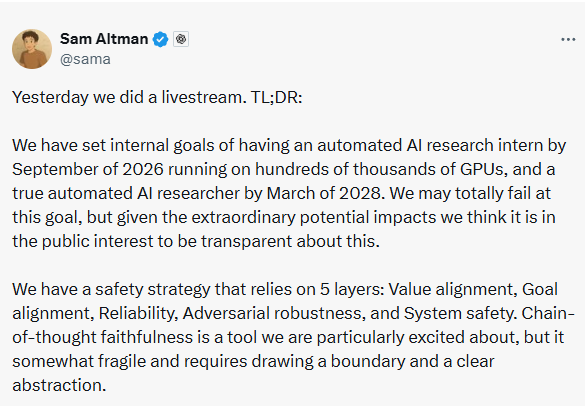
According to OpenAI’s February 27, 2026, report, ChatGPT has over 900 million weekly active users and is aiming to hit $1 billion in revenue soon. Also, Sam Altman is aiming to build a fully automated AI researcher by March 2028. This is a sign of ChatGPT’s continuous development.
Conclusion
The choice between OpenClaw and ChatGPT depends on the kind of help you need or the automation tasks you want to integrate into your workflow.
One handles tasks while you sleep. The other shows up the moment you ask. Both serve their roles well, and many users get the most value by keeping both within reach.
FAQs
OpenClaw does not wait for a prompt. By the time you check your phone in the morning, it has already sorted emails, spotted calendar conflicts, and flagged what needs attention. ChatGPT is different. You open it, type your question, and get a response. The interaction starts and ends with you.
You can use ChatGPT with OpenClaw simultaneously. OpenClaw handles background tasks, inbox monitoring, scheduled checks, file management, and other tasks that run without your involvement. ChatGPT comes in when you need a written draft, a coding problem solved, or a quick question answered. Each tool handles a different type of work.
For background automation, OpenClaw is ahead. It monitors, executes, and chains tasks together without your prompt. ChatGPT responds to questions well but does not initiate or execute tasks on its own. If automation is the goal, these two tools are built for genuinely different purposes and should not really be compared on that point.
The software is free. What costs money are the AI model powering it (which charges per API call) and the server you run it on. For light use, the monthly total can be quite low. For an agent running continuous checks across multiple tasks, those API costs are worth tracking from the start.
Safety depends on how carefully permissions are configured. The agent has real access to your system, which makes it useful, but that same access creates risk if boundaries are not clearly set. Starting with limited permissions and expanding gradually as you understand its behaviour is a much better approach than opening everything up from day one.
Basic familiarity with technical skills is needed, but it does not mandatorily require coding knowledge. Just learn how permissions work and how to think about systems. That is enough to start. Understanding file structures and knowing what access levels to grant the agent will take you further than any programming background ever would.