

WordPress 7.0 drops on May 20, 2026. It is the biggest shift this platform has seen since 2018.
Teams can now co-edit the same post in real time. AI ships natively inside the core. The admin dashboard gets its first serious redesign in over a decade. No third-party tools. No workarounds. It is all built in.
The release was delayed after a deep architectural flaw forced the core team to rebuild part of the collaboration system from scratch. Worth the wait.
This guide covers everything you need before you upgrade.
What Is WordPress 7.0? When Is It Releasing, and Why Was It Delayed
WordPress 7.0 is the first major release of 2026 and a genuine turning point for the world’s most popular CMS. It officially launches Phase 3 of the Gutenberg roadmap, a milestone the core team has been building toward since 2018. Here is the full journey at a glance:
| Phase | Focus | Year |
|---|---|---|
| Phase 1 | Block Editor | 2018 |
| Phase 2 | Full Site Editing | 2021 to 2024 |
| Phase 3 | Collaboration | 2026 WordPress 7.0 |
| Phase 4 | Multilingual | Coming next |
This release is based on the Workflows theme. Now teams can collaborate on writing, editing, reviewing, and publishing content within WordPress without leaving the platform, Google Docs, or Slack.
The official release date is May 20, 2026. It was originally planned for April 9, 2026, at WordCamp Asia in Mumbai, but the core team discovered a critical architectural issue. The real-time collaboration feature was saving sync data using post meta and was inadvertently disabling WordPress query caches sitewide when the block editor was opened. The only correct solution was to create a new database table.
Why WordPress 7.0 Is More Than a Regular Update
Most WordPress releases improve existing features. WordPress 7.0 changes how teams use WordPress day-to-day.
Here is why this update matters more than usual:
- Real-time collaboration reduces dependency on Google Docs and third-party workflow tools
- AI integrations bring content assistance directly into WordPress
- Browser-side image optimization improves performance before files even reach the server
- The redesigned admin experience modernizes a dashboard that has stayed mostly unchanged for years
- Developers get more flexibility with improved block and workflow tools
For agencies, WooCommerce stores, publishers, and growing content teams, this is not just another version upgrade. It is a workflow upgrade.
In many ways, WordPress 7.0 feels like the biggest shift since the Block Editor launched in 2018.
What Are the New Features in WordPress 7.0?
WordPress 7.0 focuses heavily on collaboration, AI workflows, performance, and a more modern editing experience. Here are the biggest changes expected in the release.
1. Real-Time Collaboration Edit Together Like Google Docs
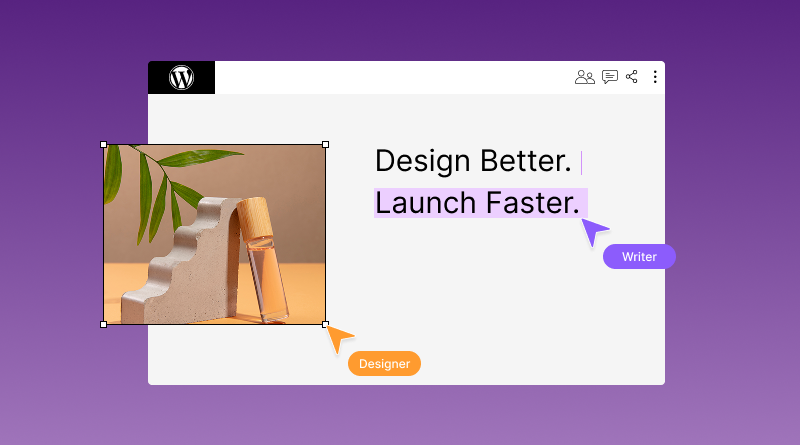
For the first time in WordPress history, multiple users can edit the same post simultaneously, with no post-locking conflicts. No “someone else is editing this” warning. Just open the post and start working together.
- Live colour-coded cursors show exactly where each person is working
- Inline comments and Notes sync in real time across all editors
- Built on Yjs, the same conflict-free merging library used by Notion
- The default limit is 2 simultaneous users, configurable based on your needs
- Posts with classic meta boxes automatically disable collaboration on that post to prevent data loss
- HTTP polling works on every standard host by default, no special setup needed
- WebSocket support is optional for teams wanting a near-instant experience
- Enable or disable it from Settings > Writing
For agencies and editorial teams, this removes the biggest daily friction in WordPress. Your entire review and editing workflow can now live inside the dashboard.
2. Native AI API One Setup, Every Plugin Benefits
WordPress 7.0 ships WP AI Client directly inside the core. Configure your AI provider once through Settings > Connectors, and every compatible plugin uses it automatically.
Confirmed providers at launch: OpenAI, Anthropic (Claude), Google (Gemini)
What it does:
- Auto-generates image alt text on upload
- Suggests content inside the block editor
- Creates SEO meta descriptions without a separate plugin
3. Performance and Developer Improvements
One of the more practical upgrades is browser-side image optimization, which reduces image size before uploads even reach the server.
Developers also get:
- PHP-only block registration
- cleaner workflow tools
- Better support for modern block development
PHP 8.3 or higher is strongly recommended for the best experience.
4. New Blocks and Admin Improvements
WordPress 7.0 is also expected to refresh parts of the admin experience that have remained mostly unchanged for years.
New additions include:
- responsive grid layouts
- breadcrumbs block
- searchable icon block
- expanded command palette support
DataViews: A Completely New Way to Manage Your Content
If you spend time inside the WordPress admin every day, this is the change you will notice immediately.
The classic Posts, Pages, Media, and Users list tables that have been part of WordPress since the beginning are replaced with DataViews, a faster React-based interface. Everything updates instantly without a page reload.
- Switch between list view and grid view on Posts, Pages, and Media
- Filter, sort, and group content without the page refreshing
- Perform bulk actions with a cleaner and more responsive interface
- See richer content previews directly inside the admin screen
Important for plugin users: Any plugin that adds custom columns, filters, or actions to the old WP List Tables will need a compatibility update for WordPress 7.0. This is one of the highest-risk areas for plugin conflicts after upgrading. Check your admin-facing plugins carefully before May 20.
5. Advanced Site Editing
The Site Editor continues to evolve with:
- visual revision history
- improved mobile menu customization
- better support for custom block patterns
For teams already using Gutenberg heavily, WordPress 7.0 feels less like a small update and more like the next stage of modern WordPress workflows.
WordPress 6.9 vs WordPress 7.0: Everything That Is Changing
Most sites today run WordPress 6.9. Here is exactly what changes the moment you upgrade to 7.0.
| Feature | WordPress 6.9 (Current) | WordPress 7.0 (May 20, 2026) |
|---|---|---|
| Collaboration | Post locking, one editor at a time | Real-time multi-user co-editing with live cursors |
| AI Integration | Third-party plugins with separate API keys | Native AI Client, one setup for all plugins |
| AI Providers | Depends on the plugin installed | OpenAI, Anthropic, and Google are built into the core |
| Block Registration | Requires JavaScript | PHP-only registration is now supported |
| Media Processing | Server-side after upload | Browser-side compression before upload |
| Admin Interface | Last major redesign in 2013 | Refreshed colours, typography, and transitions |
| Revision System | Text diff comparison | Visual timeline slider with timestamps |
| Command Palette | Block editor only | Available across the entire WP-Admin |
| Custom CSS per Block | Class name plus Site Editor workaround | Direct CSS input in the Advanced panel |
| Mobile Menus in Editor | Not available | Dedicated mobile-only patterns and overlays |
| Gutenberg Phase | Phase 2 Full Site Editing | Phase 3 Collaboration |
| PHP Recommended | 8.0 and above | 8.3 or 8.4 |
If your site is running WordPress 6.9 today, this table shows exactly what you gain on May 20, 2026.
The Biggest Risk With WordPress 7.0
The biggest challenge with WordPress 7.0 is not the update itself. It is plugin compatibility.
Features like real-time collaboration, new block APIs, AI integrations, and admin changes will affect plugins that heavily customize the editor or rely on older workflows. Page builders, SEO plugins, multilingual tools, and WooCommerce extensions should be tested carefully before updating a live site.
If your website depends on multiple plugins working together, skipping staging and updating immediately after release could create unexpected issues.
The safest approach is simple:
- Update plugins first
- test WordPress 7.0 on staging
- Wait a few days after launch for early patches and compatibility updates
For most websites, a little patience will avoid a lot of problems later.
Should You Upgrade to WordPress 7.0 Immediately?
For most websites, updating to WordPress 7.0 on day one may not be the smartest move.
Major WordPress releases often receive compatibility fixes and small stability patches during the first few days after launch. That becomes even more important with WordPress 7.0 because collaboration features, AI integrations, and editor-level changes may affect plugins that interact heavily with the dashboard.
You should consider waiting before upgrading if:
- Your site depends on WooCommerce
- You use older plugins
- Your website relies heavily on page builders
- You run multilingual plugins or custom workflows
- Your business cannot afford downtime
Updating earlier makes more sense if:
- Your plugins are actively maintained
- You already use the Block Editor heavily
- You have a staging environment for testing
- Your hosting supports PHP 8.3 or higher
For most businesses, the safest approach is simple: test first, wait a few days after release, then update confidently once the ecosystem settles.
WordPress 7.0 Hosting Requirements and WebSocket Support Explained
WordPress 7.0 places more focus on server performance and real-time workflows than previous releases, so your hosting environment matters more than ever.
Here are the recommended requirements for a smooth upgrade experience:
| Requirement | Minimum | Recommended |
|---|---|---|
| PHP | 7.2 | 8.3 or 8.4 |
| MySQL | 5.5.5 | 8.0 |
| MariaDB | 10.4 | 10.6 |
| HTTPS | Required | Required |
| WebSockets | Not required | Optional |
Upgrading to WordPress 7.0 should be a priority if your site is still using PHP 7.x. The majority of the performance and security enhancements are targeted at PHP 8.3 and newer.
WebSockets are not required; they’re optional. Collaboration features can still be used with WordPress 7.0, and can be implemented with standard HTTP polling, which is supported by most web hosting environments without extra configuration. WebSocket support, however, can be useful for websites with larger editorial teams, as it allows for quicker real-time syncing and a smoother collaborative editing experience.
How to Update WordPress to Version 7.0 Without Breaking Your Site
Before upgrading, follow these 7 steps.
Step 1: Ensure that you have the correct version of PHP. Go to Tools > Site Health in your WordPress dashboard. Requires PHP 7.2 or higher; PHP 8.3 is recommended. Update it from your hosting control panel before May 20th.
Step 2: Back Up Your Entire Site. Back up your database and all files first. A full backup only takes a few minutes and is your backup in case of any problems.
Step 3: Set Up a Staging Environment. Avoid making a big change on your live site. Copy it to a staging site, test WordPress 7.0 on that site first, and then deploy to live once it’s all working.
Step 4: Test Plugin and Theme Compatibility Review all active plugins, particularly those related to the block editor, SEO meta boxes, AI capabilities, and custom post types. When upgrading, check the “Tested up to” section of each plugin’s WordPress.org page.
Step 5: Wait a couple of days after release. Most major WordPress releases are patched quickly in the first 1-2 weeks. The risk is significantly reduced, and there is little risk if you wait a few days after May 20th.
Step 6: Run the Update. Go to Dashboard > Updates and then click Update to WordPress 7.0. It only takes under 2 minutes.
Step 7: Test Your Live Site: Test your homepage, landing pages, forms, checkout (if you have a store), and any new AI or collaboration features. When things go wrong, your Step 2 backup will come in handy.
What Plugins Are Compatible With WordPress 7.0?
Most actively maintained WordPress plugins should work without major issues. The biggest compatibility risks are usually tied to plugins that heavily modify the block editor, admin dashboard, or AI workflows.
Here are the areas that deserve extra attention before upgrading.
SEO Plugins
Plugins like Yoast SEO and Rank Math are expected to support WordPress 7.0 quickly, but some classic meta box features may temporarily affect real-time collaboration inside the editor.
Page Builders
Elementor, Bricks, and Divi users should test layouts carefully on staging. WordPress 7.0 introduces deeper block and PHP-related changes that could affect custom builder elements or templates.
AI Plugins
Plugins using separate OpenAI or Anthropic API connections may need updates to work smoothly alongside the new native AI integrations expected in WordPress 7.0.
Caching Plugins
Tools like WP Rocket, LiteSpeed Cache, and W3 Total Cache may require additional testing after upgrading. Real-time collaboration creates more background requests than traditional editing workflows.
WooCommerce
Before updating live stores, WooCommerce stores should be carefully tested. It is important to pay special attention to product pages, checkout flows, media uploads, and custom store plugins during staging tests.
Forms, Membership, and LMS Plugins
Many plugins, such as Gravity Forms, MemberPress, LearnDash, and WPForms, integrate with the WordPress admin area in a very deep way. Carefully test forms, dashboards and user workflows after upgrading.
Multilingual Plugins
WPML and Polylang users should avoid updating production sites immediately. Translation-heavy websites usually need more compatibility testing after major WordPress releases.
Classic Editor Plugin
If you still rely on the Classic Editor plugin, many collaboration-focused features in WordPress 7.0 will not be available. This update clearly pushes WordPress further toward the Block Editor ecosystem.
A Simple Rule to Follow
If a plugin has not been updated in several months or does not mention WordPress 7.0 compatibility yet, wait before updating your live website. A quick staging test now can prevent major problems later.
How to Update All WordPress Links to a New Domain
Many teams migrate to a new domain around the same time as a major WordPress upgrade. Here is the safest way to update every link in one go.
Method 1 WP-CLI (Recommended)
This is the fastest and most complete method. Run this single command in your terminal:
wp search-replace ‘olddomain.com’ ‘newdomain.com’ –all-tables
It handles serialized data correctly and updates every database table in one pass. No manual work required.
Method 2 Better Search Replace Plugin (Best for Beginners)
Install the free Better Search Replace plugin from WordPress.org. It handles serialized data the same way WP-CLI does and includes a dry-run option so you can preview every change before applying it. Ideal if you are not comfortable with the command line.
Method 3 phpMyAdmin (Basic Sites Only)
This method works only for very simple sites. It misses serialized data, requires editing each database table manually, and is not recommended for WooCommerce stores or sites with complex setups.
One Step Everyone Forgets
After updating your links, go to Settings > Permalinks and click Save Changes. This re-registers all your URL structures with the new domain and prevents broken links on the frontend.
At BigCloudy, WP-CLI access is included on all hosting plans, and our support team is available to assist if you are migrating your domain alongside your WordPress 7.0 upgrade.
Who Will Benefit Most From WordPress 7.0?
WordPress 7.0 is built for teams and modern workflows, not solo publishing.
You will benefit most if you are:
- An agency managing multiple clients and editors
- An editorial or content team tired of coordinating outside WordPress
- A WooCommerce store dealing with heavy media uploads
- A developer building block-based websites
- A business already using Gutenberg heavily
You can afford to wait if you are:
- A solo blogger on older plugins
- Still using the Classic Editor
- Running a simple site that does not need collaboration or AI features
Conclusion:
WordPress 7.0 feels like a much bigger shift than a typical version update. Real-time collaboration, AI-assisted workflows, performance improvements, and a refreshed editing experience all point toward a more modern and team-focused future for WordPress.
Before upgrading, take time to test plugin compatibility, update your PHP version, and use a staging environment whenever possible. A careful upgrade is always better than a rushed one. If you are preparing for WordPress 7.0, having the right hosting environment also matters. BigCloudy’s WordPress hosting already supports PHP 8.3 and 8.4, staging environments, and WordPress-ready performance optimizations to help make the transition smoother and more reliable.
FAQs:
WordPress 7.0 officially releases on May 20, 2026. It was originally scheduled for April 9, 2026, but was delayed after the core team discovered a critical architectural issue in the real-time collaboration system. The fix required building a dedicated database table from scratch, pushing the launch back by six weeks.
WordPress 7.0 requires a minimum of PHP 7.2, but PHP 8.3 or 8.4 is strongly recommended for best performance and security. You can check your current PHP version by going to Tools > Site Health in your WordPress dashboard. Update it before May 20 to get the most out of this release.
WordPress 7.0 natively supports three AI providers at launch: OpenAI, Anthropic (Claude), and Google (Gemini). You configure your preferred provider once through Settings > Connectors, and every compatible plugin on your site uses those credentials automatically. No more managing separate API keys for each plugin. Will my plugins break after updating to WordPress 7.0?
Most well-maintained plugins will not break. The highest risk areas are plugins using classic meta boxes, plugins with their own AI integrations, and page builders that extend the block editor. Always test on a staging site first, check the “Tested up to” field on each plugin’s WordPress.org page, and wait one week after release before updating your live site.
Yes, without question. WordPress powers over 43% of all websites on the internet and holds a 62.8% share of the CMS market as of 2026. With WordPress 7.0 bringing real-time collaboration and native AI directly into core, the platform is actively evolving into a full team workflow tool, not just a publishing system.