


Quick Answer
Building a professional WordPress website involves choosing a domain name, purchasing hosting, installing WordPress, selecting a theme, adding the necessary plugins, creating essential pages, optimizing performance, and publishing the website.
The entire process can usually be completed within a few hours, and most websites can be built without advanced technical knowledge or coding experience.
WordPress powers more than 43% of all websites on the internet. In the past, building a professional website often required a developer, a large budget, and weeks of work. Today, with the right tools and a clear plan, almost anyone can build a fast, professional, and fully functional website.
From creating a personal blog to setting up an online store to building a website for your business, WordPress provides you with the flexibility to build exactly what you need without writing one line of code.
It’s not about the tools; it’s about getting started, choosing the right tools, and avoiding the mistakes that slow many beginners down. This guide will take you through the entire process, from registering a domain name to creating a professional WordPress website in 2026.
Why Choose WordPress in 2026?
Every year there is a new website builder that promises to make website building faster, smarter and easier. But WordPress continues to power a big portion of the web. More than 60% of all websites are built using a content management system, according to W3Techs. It is no wonder that freelancers and bloggers as well as multinational companies are still using the platform.
WordPress is an open-source content management system (CMS) that gives website owners complete control over their content, design, and functionality. Unlike many closed platforms that limit customization and flexibility, WordPress allows you to build and manage your website exactly the way you want.
It is popular because of its versatility. An online store can be a simple blog. A portfolio site can turn into a membership site. A small business website can become a worldwide brand without having to shift to a totally new platform.
WordPress is frequently used to create:
- Personal blogs
- Business websites
- Online stores
- Agency websites
- Membership platforms
- Educational websites
- News websites
- Portfolio websites
WordPress is different from other site builders, as you have complete control over the content, design, hosting, and future growth of your site. Unlike closed platforms, you don’t have to deal with restrictions, and that’s one of the top reasons businesses are still investing in WordPress.
System Requirements for WordPress in 2026
WordPress doesn’t require expensive hardware to run efficiently. Most websites can run smoothly with the following specifications:
| Component | Recommended Requirement |
|---|---|
| PHP | PHP 8.2 or later |
| Database | MySQL 8.0 or MariaDB 10.6+ |
| Web Server | Apache, Nginx, or LiteSpeed |
| Storage | NVMe SSD storage |
| Memory | 1 GB – 2 GB RAM |
| Processor | 1 – 2 CPU cores |
| SSL Certificate | Recommended |
If you’re running an online store or a high-traffic website, you’ll probably need additional resources to maintain performance.
For most beginners, choosing a reliable hosting provider is far more important than focusing on server specifications alone. A well-optimized environment can make a significant difference in speed, security, and overall performance.
How Much Does It Cost to Build a WordPress Website in 2026?
One of the first questions people ask before creating a website is, How much will this cost?
The answer depends entirely on the type of website you want to build. A simple blog will naturally cost less than an online store or a membership platform. The good news is that most beginners can launch a professional website without spending thousands of dollars.
Here’s a realistic estimate of what you can expect to pay.
| Item | Typical Cost |
|---|---|
| Domain Name | $10 – $20 per year |
| WordPress Hosting | $3 – $20 per month |
| Premium Theme | $50 – $100 |
| Premium Plugins | $0 – $200 |
| Logo and Design Assets | Optional |
When you’re just beginning the investment, you will typically spend between $50 – $300 for the first year, depending on the features you require.
Many website owners also choose managed WordPress hosting because it combines several essential services into a single package. Security tools, SSL certificates, performance optimization tools, automatic backups, technical support, and routine maintenance are all handled in one place instead of requiring separate purchases and configurations.
With managed WordPress hosting from BigCloudy, beginners can build, launch, and grow their websites without worrying about the technical details.
How Long Does It Take to Build a WordPress Website?
The time required to build a WordPress website depends on the type of website you’re creating and the amount of customization involved. A simple website can often be completed within a few hours, while larger projects may take several days or even weeks.
| Website Type | Estimated Time |
|---|---|
| Personal Blog | 2 – 4 hours |
| Portfolio Website | 4 – 8 hours |
| Business Website | 1 – 3 days |
| Online Store | 3 – 7 days |
The easiest way to save time is to choose reliable hosting, use a lightweight theme, and focus on the essential features first. You can always add more functionality as your website grows.
What Are the Pros and Cons of WordPress?
WordPress gives you complete control over your website, making it one of the most flexible platforms available. At the same time, it requires regular updates and basic maintenance to keep everything running smoothly.
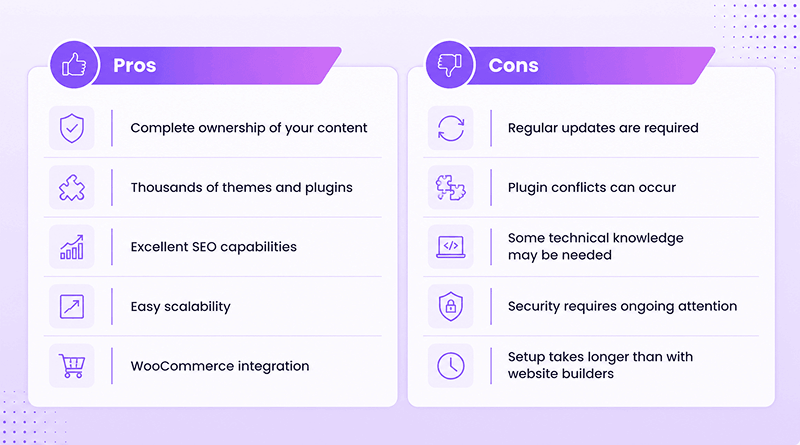
For most people, the advantages outweigh the learning curve, especially if long-term growth, customization, and complete control are important.
How to Build a Professional WordPress Website Step by Step
Experienced developers focus on building a strong foundation before moving on to design and customization. Following the same approach will save time and help you avoid common mistakes.
Step 1: Choose the Right Domain Name
Your domain name is among the initial things that people will observe about your website. It will appear in search results, be typed into browsers, and be remembered by visitors long after they have left your site, and it will be connected to your brand. Many people don’t realize how crucial it is to select the right name.
Ideally, a domain name will be short, easy to remember, easy to pronounce, and related to your business, brand or idea. Generally, it is preferable not to include numbers, hyphens, or complex spellings as these can make the name more difficult to remember.
If possible, use a .com domain as it is the most widely used domain extension. Other extensions like .org, .net, .co and .store can also be effective, depending on the kind of website you are creating.
Examples of good names are mountaintrail.com, brightmedia.com, and pixelstudio.com, which are easy to remember, simple, and can be expanded as a business grows.
Avoid choosing a domain name simply because it’s trending. While trends come and go, a domain name can be a business’s asset for years.
Step 2: Buy Reliable WordPress Hosting
For most beginners, deciding on colours, layouts and fonts is a lengthy process, and they are not very concerned about their hosting provider. Unfortunately, that’s where the problem begins. While your site might look great, its performance is what will keep visitors.
A good hosting provider assists you with:
- Having your website available 24/7
- Secure storage of website files and databases
- Improving loading speeds
- Creating regular backups
- Ensuring your website is secure against threats
- Dealing with traffic surges
When you’re looking at the various hosting options, keep an eye on the following features:
- A high uptime guarantee
- NVMe or SSD storage
- Automatic backups
- Built-in security tools
- Quick and efficient customer service
- One-click WordPress installation
Quick Tip: Avoid purchasing your domain, hosting, email service, security tools, and other services from multiple providers unless you have a specific reason to do so. Keeping everything in one place makes your website easier to manage, simplifies billing, and reduces technical issues as your site grows.
Step 3: Connect Your Domain and Install WordPress
Once you have purchased hosting, it’s time to bring everything together. Most modern hosting providers allow you to install WordPress in just a few minutes.
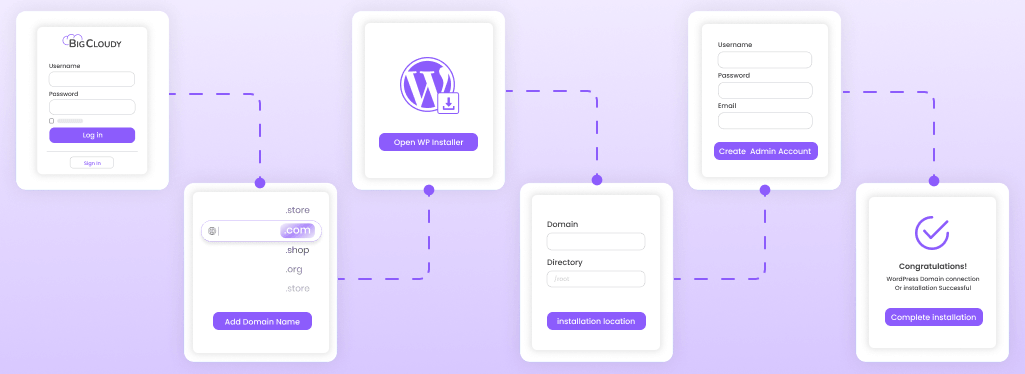
The process usually looks like this:
- Log in to your hosting account.
- Add your domain name.
- Open the WordPress installer.
- Choose the installation location.
- Create your administrator account.
- Complete the installation process.
After the installation is complete, you’ll receive a link to your WordPress dashboard, usually in the format yourwebsite.com/wp-admin. This is where you’ll manage your entire website.
Step 4: Understand the WordPress Dashboard Before You Build Anything
Before installing themes and plugins, take a few minutes to explore the WordPress dashboard. Understanding how the platform works from the beginning will make managing your website much easier later.
The Posts section is used for blog articles and news updates, while Pages contains content such as your homepage, contact page, and about page. You’ll use Appearance to manage themes, menus, and layouts, and Plugins to add new features to your website.
The Media library stores images, videos, and documents; Users allows you to manage roles and permissions, and Settings gives you control over important options such as permalinks, privacy settings, and website information.
Step 5: Choose a Professional Theme
People often confuse themes, templates, and page builders, but each one serves a completely different purpose.
- A theme controls the overall appearance of your website.
- A template determines the layout of an individual page.
- A page builder allows you to customize pages using drag-and-drop tools.
Once you understand the difference, choosing a theme becomes much easier.
Instead of focusing on colours and visual effects alone, pay attention to factors such as loading speed, mobile responsiveness, plugin compatibility, search engine optimization, and regular updates.
Themes such as Astra, Kadence, and GeneratePress remain popular because they are lightweight, flexible, and suitable for both beginners and experienced users.
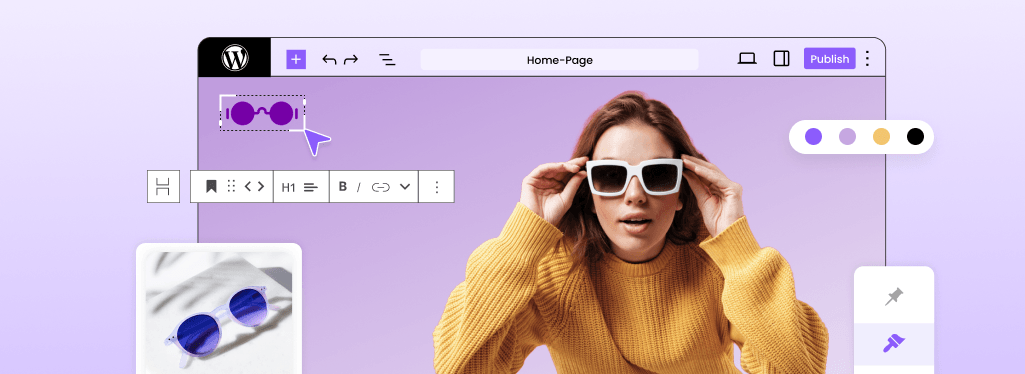
Step 6: Customize Your Website Design
This is the stage where your website starts to take shape. Rather than trying to change everything at once, focus on building a clean and consistent design.
Start with the basics:
- Upload your logo.
- Select colours that match your brand.
- Choose clear, readable fonts.
- Design your homepage.
- Create navigation menus.
- Configure the header and footer.
- Test the mobile version of your website.
Step 7: Create the Essential Pages
Visitors expect certain pages to be available as soon as they arrive on a website. Even the most attractive design can feel incomplete if important information is missing.
| Page | Purpose |
|---|---|
| Home | Creates a strong first impression. |
| About | Builds trust and credibility. |
| Services | Explains the products or services you offer. |
| Blog | Improves search visibility and helps attract visitors. |
| Contact | Makes it easy for visitors to reach you. |
| Privacy Policy | Supports legal compliance and protects user information. |
| Terms and Conditions | Protects your business and establishes clear guidelines. |
Take the time to create these pages properly. A smaller website with useful and complete information will always leave a better impression than a larger website filled with unfinished content.
Step 8: Install Only the Plugins You Need
Plugins are one of the reasons WordPress is so powerful. They allow you to add new features without writing code, but that doesn’t mean every plugin deserves a place on your website.
Start with the essentials and expand gradually as your website grows.
| Purpose | Recommended Plugins |
|---|---|
| SEO | Rank Math, Yoast SEO |
| Caching | LiteSpeed Cache |
| Security | Wordfence |
| Contact Forms | WPForms |
| Backups | UpdraftPlus |
| Image Optimization | ShortPixel |
Every plugin adds extra code that your website must load and maintain. Choosing a handful of reliable tools is usually a better approach than installing dozens of features you’ll rarely use.
Step 9: Optimize Your Website Before Publishing
Professionals never launch a website immediately after finishing the design. Instead, they perform one final review.
Use this checklist before going live:
- Verify that SSL is active.
- Test the mobile version.
- Compress large images.
- Create SEO titles and descriptions.
- Upload a favicon.
- Test contact forms.
- Fix broken links.
- Create a backup.
- Connect Google Analytics.
- Verify your website in Google Search Console.
- Run a speed test.
These small improvements can make a surprisingly large difference.
Step 10: Launch Your Website
After all the planning, designing, and testing, the time has finally come to launch your website. Before you publish it, take a few minutes to perform one final review.
Make sure you have completed the following tasks:
- Check that all pages are working correctly.
- Test contact forms and navigation menus.
- Verify that the mobile version looks good.
- Create a backup of your website.
- Run a final speed test.
Once everything is ready, publish your website and celebrate the achievement.
Keep in mind that launching a website is only the beginning. To keep it secure, fast, and competitive, you should regularly update WordPress, create backups, monitor performance, and publish fresh content. The most successful websites are not built overnight. They improve gradually over time.
Common Mistakes to Avoid When Building a WordPress Website
Building a website is easier than ever, but small mistakes made in the early stages can create bigger problems later. Here are some of the most common ones to avoid.
Choosing Hosting Based Only on Price
Many people spend days selecting the perfect theme while paying very little attention to their hosting provider. Slow loading speeds, frequent downtime, and poor support can affect your website long after launch.
Installing Too Many Plugins
WordPress offers thousands of plugins, but adding too many can create compatibility problems and reduce performance. It’s usually better to choose a handful of reliable tools than to fill your website with features you may never use.
Ignoring Regular Backups
Updates, software conflicts, and accidental changes can happen at any time. Without a recent backup, restoring a website can become a frustrating and time-consuming process.
Uploading Large Images Without Optimization
High-resolution images often look impressive, but they can significantly increase loading times. Compressing images before uploading them helps maintain both speed and user experience.
Forgetting the Mobile Experience
A website that looks perfect on a desktop computer may appear completely different on a smartphone. Testing layouts, menus, images, and forms on multiple screen sizes should always be part of the process.
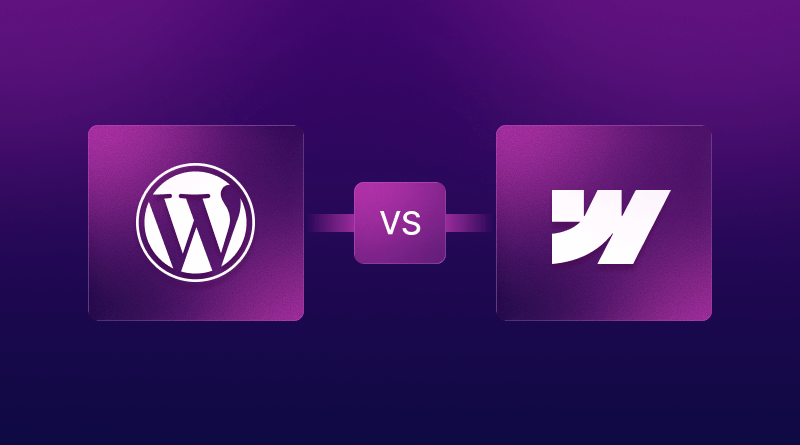
Is WordPress Better Than a Website Builder?
Over the past few years, AI-powered website builders have become incredibly capable. At the same time, WordPress has continued to evolve and remains the preferred choice for millions of businesses, creators, and online stores.
The truth is that both options have their strengths.
| WordPress | Website Builders |
|---|---|
| Greater customization options | Faster setup process |
| Better long-term scalability | More beginner-friendly |
| Thousands of themes and plugins | Most tools are built in |
| Complete control | Minimal maintenance |
| Greater flexibility | Simpler learning curve |
| Ideal for growing businesses | Perfect for quick launches |
Website builders are designed for speed and simplicity. In many cases, you can choose a template, answer a few questions, and publish your website within a few hours.
WordPress takes a little longer to set up, but it gives you much more freedom as your website grows. You can change designs, install plugins, optimize performance, create custom functionality, and scale your website without being restricted by a closed ecosystem.
If you want complete control, advanced customization, strong SEO capabilities, and the flexibility to expand your website in the future, WordPress is an excellent choice.
If your goal is to launch a simple website as quickly as possible while spending less time on maintenance, an AI website builder might be a better option.
Both approaches solve different problems, and neither is automatically better than the other. The right decision depends entirely on your goals, your budget, and how much control you want over your website.
Conclusion
Building a professional WordPress website in 2026 is much simpler than it was just a few years ago. You don’t need advanced technical skills or a large budget. You simply need the right tools and a clear process.
From choosing a domain name and reliable hosting to customizing your design and launching your website, every step plays an important role in creating a strong online presence.
One thing you should never overlook is your hosting provider. Fast performance, strong security, regular backups, and dependable support can make a significant difference over time. Managed WordPress hosting from BigCloudy is designed to handle these technical tasks, allowing you to spend more time building your website and less time troubleshooting problems.
Your first website does not need to be perfect. It simply needs to exist. Start small, keep learning, and improve it one step at a time.